If you have been used to using the Classic Editor with your WordPress website, you might be infuriated by the new Block Editor that comes as standard with all installations from WordPress 5.0 onwards.
It is a very simple process to restore the Classic Editor.
The WordPress team have released a plugin called Classic Editor
Classic Editor is an official plugin maintained by the WordPress team that restores the previous (“classic”) WordPress editor and the “Edit Post” screen. Because it is an official WordPress plugin you can be sure it will be updated and fully supported until at least 2022.
With this plugin there are the following options:
- Admins can select the default editor for all users.
- Alternatively admins can allow users to choose which editor to use (Classic or the new Gutenberg Block) on a post by post basis.
- Each post will open in the last editor used regardless of who edited it last. This helps to maintain a consistent editing experience.
Simply install the plugin through the “Add New” option. Search “Classic Editor“. Activate the plugin.
In settings you can pick the default editor and whether users are to be allowed to switch editors. If you do not want to have the option to pick the editor each time, make sure that the admin sets the option “Allow users to switch editors” to “No”
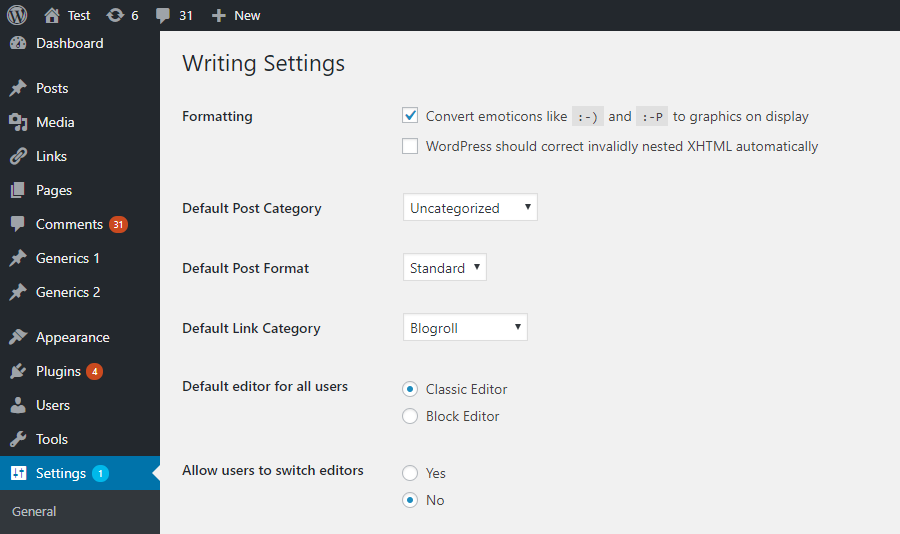
It is possible to set the default editor for individuals in the profile settings.

If you want to have the option to pick the editor each time, make sure that the admin sets the option “Allow users to switch editors” to “Yes” .
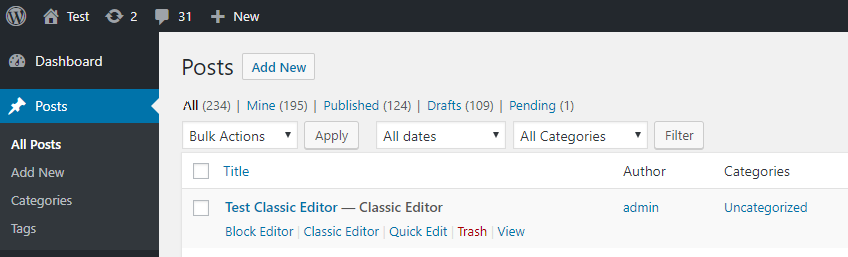
When viewing the list of posts or pages thereafter, you will see the options for choosing to open that page with either editor. By default the page or post will open with whichever editor was used to create it originally, unless an alternative is chosen.
From the WordPress 5.8 update, a new block widget layout was introduced. As with the Block editor, the WordPress Team has provided a “Classic Widgets” plugin. Simply installing this, will restore the original classic widget layout.
There is no other configuration, the classic widgets settings screens are enabled or disabled by either enabling or disabling this plugin.
Get the Classic Widgets Plugin