Creating categories in the Joomla 3.1 Banner Component is great for organising your adverts and can also help you to display adverts in various positions and on different pages on your site.
For example, if you have a website which sells pet products, you might only wish to show adverts relating to dogs on the dog product pages and only relating to cats on the cat products pages . Setting up categories and clients can help you do this easily.
If you only have a small number of adverts on your site, you may not need to utilise the categories and clients sections.
Creating a category in the Joomla 3.1 Banner Component
In the admin panel, click on Components > Banners > Categories.
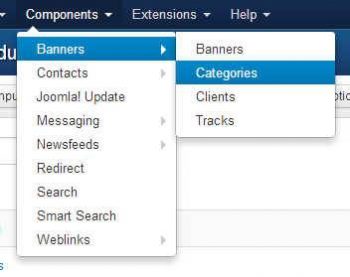
Click the NEW button in the usual way.
In this section, all you need to do is to give your category a name. The category will then be available as an option when you create your banner advert.
Having categories will allow you to configure your banner module to only show adverts from a chosen category on a particular page.
The next step is to set up clients.
How to set up the client details in Joomla 3.1 Banner Component
If you set up clients in the banner component you will be able to configure your banner module to only show adverts from a particular client on any chosen page.
Go to the Client section and click NEW as usual.
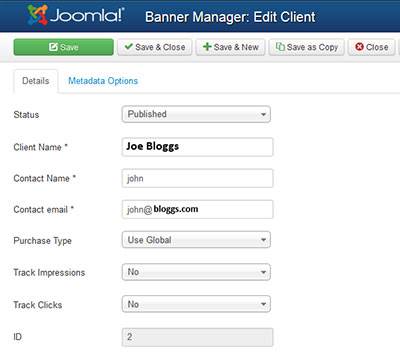
You need to complete all the fields with an asterisk.
The purchase Type indicates which of the following options the client has purchased:
- Unlimited
- Yearly
- Monthly
- Weekly
- Daily
By default the component is set to “Unlimited“.
You should also choose whether to Track the impressions (number of times the advert is displayed to a visitor)
and/or whether to track the clicks (number of times a visitor clicks on the advert and follows the link).
When you create your banner module in order to display the adverts, you will find drop-down options for clients and categories once you have these set up.
Step 3 is to add your banner adverts
How to create banner adverts in Joomla3.1